3D Printing What Is Retraction - Are you tired of dealing with stringing, oozing, or blobs in your 3D prints? One of the main causes of these issues is improper retraction settings. Retraction is the process of pulling the filament back into the extruder to prevent molten plastic from leaking out when it's not supposed to. Getting the correct retraction settings can make all the difference in your 3D prints. In this post, we will cover everything you need to know about retraction and how to set it up correctly.
What is Retraction?
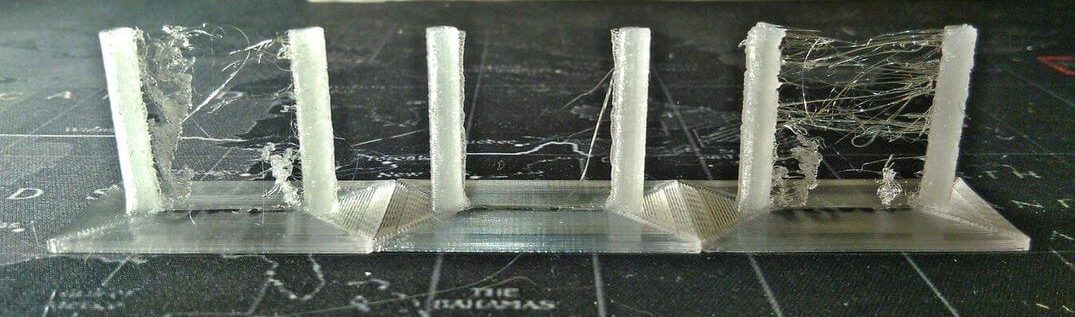
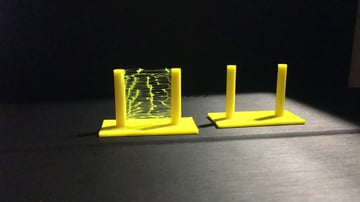
Retraction is a feature in 3D printing software that is responsible for pulling the filament back into the extruder when it's not being used. The purpose of retraction is to avoid problems like stringing, oozing or blobs on your finished print. When 3D printers start printing, the filament is pushed through the nozzle, and when the printer needs to move to a different location without printing, the filament needs to stop coming out of the nozzle. If the filament continues to come out of the nozzle, it can create strings or blobs that are unsightly and make your 3D print look bad.
Why is Retraction Important?
When 3D printing, it's essential to get the right retraction settings to avoid problems like stringing, oozing, or blobs. These issues can ruin the quality of your prints and cause them to fail. Retraction is a necessary tool when it comes to 3D printing, and it helps you to get precision and accuracy in your print jobs.
How to Enable Retraction
Enabling retraction in your 3D printing software is easy. Most printers use software like Cura or Simplify3D, which allows you to control retraction settings in their software. To enable retraction, go to the settings, choose retraction speed, distance, and enable the retraction check-box. Once you have enabled retraction in your software, you can start making changes to the settings to get the desired result.
Retraction Speed and Distance
The retraction speed and distance are two of the most important settings when it comes to setting up your 3D printer correctly. Retraction speed refers to the speed at which the filament is retracted back into the extruder when it's not being used. The retraction distance is the amount of filament that gets retracted back into the extruder. By default, the retraction speed is usually set to 40-50 mm/s, but it can be adjusted depending on your print job's speed and complexity. The recommended retraction distance is between 5mm-7mm. If you're experiencing excessive stringing, the distance can be increased, and if it's under-extruding, you can reduce the retraction distance.
Retraction Settings for Bowden vs Direct Extruders
The way retraction works can vary depending on the type of extruder your printer uses. There are two main types of extruders; Bowden and Direct Extruders. A Bowden extruder has a tube that feeds the filament from the spool to the hot end. A Direct Extruder is directly mounted onto the hot-end on your printer. Bowden extruders require more retraction distance than direct extruders because of the extra distance between the extruder motor and the hot-end. Typically, it's recommended to set the retraction distance to 6.5mm for Bowden style printers and 1-2 mm for direct extruders.
Retraction Tips
Here are some additional tips to keep in mind when setting up retraction:
- Start with the default retraction settings in your software and adjust them based on your desired results.
- Understand your printer well to identify what's causing stringing, blobs or oozing and correct the retraction settings as required.
- Always calibrate your extruder before printing to ensure accurate retraction settings.
- Ensure that you use the correct filament with the appropriate retraction settings. Changing filaments can lead to different retraction settings, so you need to customize them per the filament you are using.
Conclusion
Retraction is an essential aspect of 3D printing that can make all the difference in the quality of your prints. It's a tool that can help you achieve precise and accurate prints by avoiding issues like stringing, blobs, or oozing. Understanding retraction settings and how to control them is critical to achieving your intended results. By taking the time to configure your retraction settings correctly, you can improve the quality of your prints and reduce the amount of time spent cleaning them up.


View more articles about 3d Printing What Is Retraction